



Oops... looks like the spiders padded through here
Add products to your cart and remove them from here Lets buy
On this page, you will find information on the join messages and the chat format.
Join and Leave messages are also easy to set up. You can customize them by clicking on their respective item in the settings menu, as shown below.

On Join Editor
Currently Join n Leave messages can only be adjusted via the config.yml
  messages:
    default:
      join-message: '&a[+] &2%player% &7connected.'
      quit-message: '&4[-] &c%player% &7disconnected.'
  no-trigger-when-changing-worlds: false
With First Join Actions, you can execute specific commands when a player joins your server for the first time.
.png)
First Join Actions
With Every Join Actions, you can execute specific commands every time a player joins your server.

Every Join Actions
every-join-actions:
  - '[GAMEMODE] adventure'
  - '[SOUND] ENTITY_PLAYER_LEVELUP;1;1'
  - '[TITLE] &b&lWELCOME;&f%player%;20;60;20'
  - '[MESSAGE] &5&m-----------------------------------'
  - '[MESSAGE]  &7Welcome to Lobby, &d%player%&7!'
  - '[MESSAGE] '
  - '[MESSAGE]  &2Website: &fwww.phoenixplugins.com'
  - '[MESSAGE]  &9Discord: &fwww.phoenixplugins.com/media/discord'
  - '[MESSAGE] '
  - '[MESSAGE]  &7Made by &dPhoenixStore &7with &5❤'
  - '[MESSAGE] &5&m-----------------------------------'
  - '[POTION_EFFECT] SPEED;-1;1'
  teleport-spawn: true
  clear-inventory: true
  remove-effects: true
  firework:
    enabled: true
    first-join-only: false
    type: BALL_LARGE;1;true;true;[#00ffff;#ff0000;#008080;#ffffff]
  lobby-items:
    enabled: true
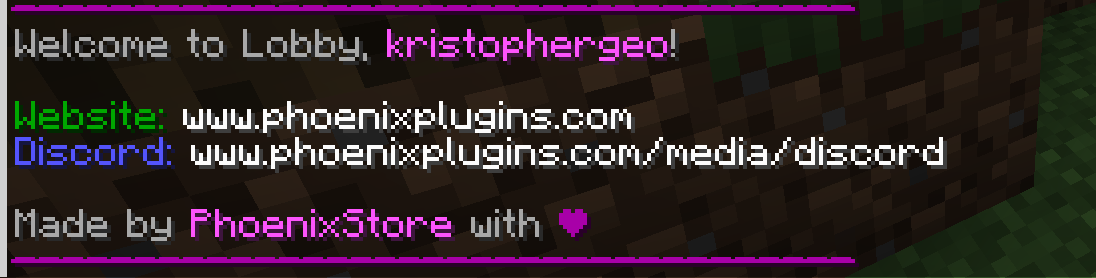
Every Join Actions - In-Game
Oops... looks like the spiders padded through here
Add products to your cart and remove them from here Lets buy